3. Debian Application
Account: linaro;
Password: linaro
3.1 Serial Terminal
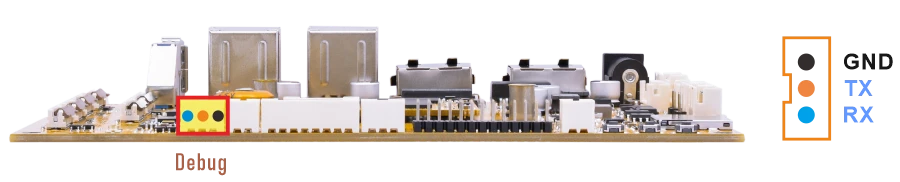
❶ Connect the USB-to-serial module to the PC and connect the other end to the Debug UART interface on the board.
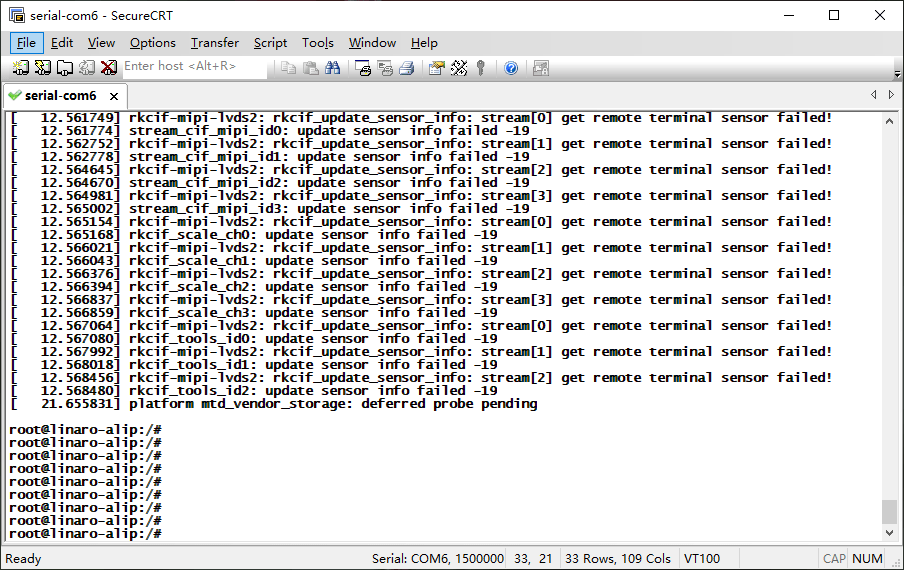
❷ Open a serial terminal tool on the PC, select the corresponding serial port, and set the baud rate to 1500000.
❸ Power on the board and check whether the boot log is displayed in the serial terminal.
3.2 Display
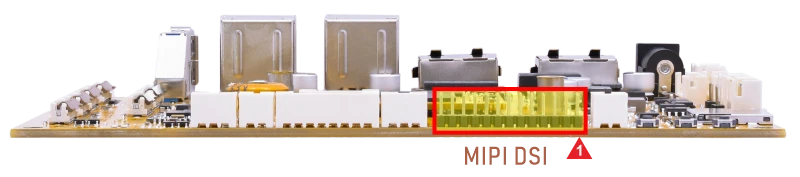
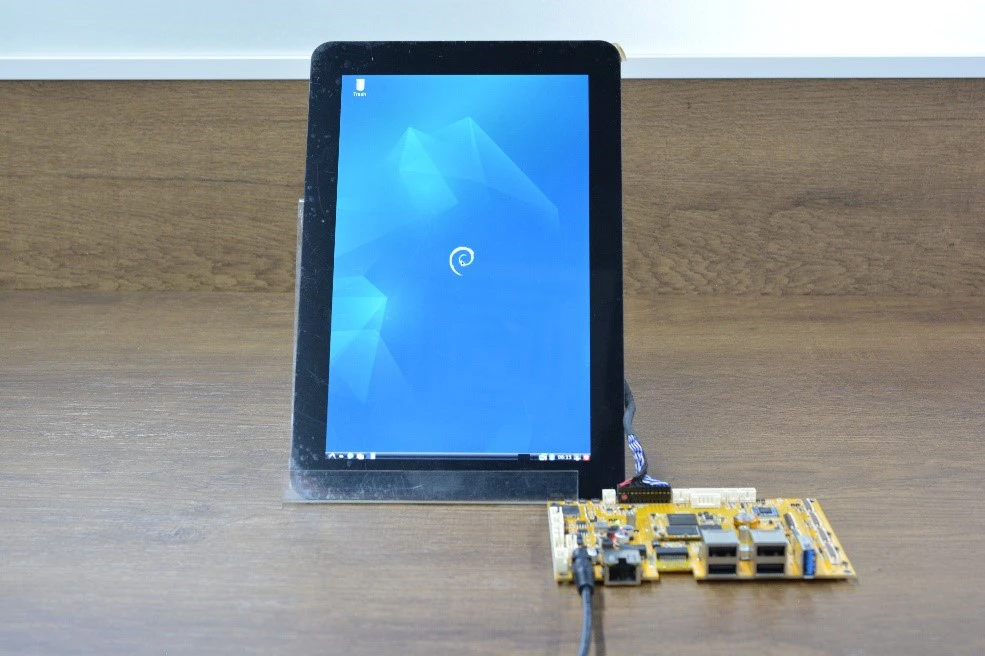
Connect the board and MIPI LCD (default 800×1280 @60Hz), then start up.
3.3 USB
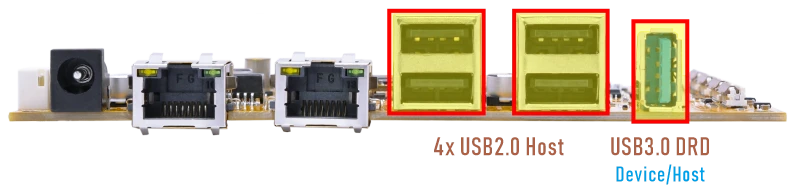
3.3.1 USB3.0 DRD
The USB3.0 DRD supports both Host and Device roles, with Device as the default configuration for image flashing/upgrading. It can be switched to host mode by command, after which it supports peripherals such as mouse, keyboards, and USB flash drives.
1echo host > /sys/kernel/debug/usb/21500000.usb/mode
root@linaro-alip:/# echo host > /sys/kernel/debug/usb/21500000.usb/mode
root@linaro-alip:/# [12017.541944] dwc3 21500000.usb: request 00000000dc84b3cd was not queued to ep0out
[12017.543220] android_work: did not send uevent (0 0 0000000000000000)
[12017.580107] read descriptors
[12017.580140] read strings
[12017.648351] phy phy-21400000.usb2-phy.2: illegal mode
[12017.648388] xhci-hcd xhci-hcd.1.auto: xHCI Host Controller
[12017.648632] xhci-hcd xhci-hcd.1.auto: new USB bus registered, assigned bus number 3
[12017.648773] xhci-hcd xhci-hcd.1.auto: hcc params 0x0220fe64 hci version 0x110 quirks 0x0002008022010010
[12017.648815] xhci-hcd xhci-hcd.1.auto: irq 81, io mem 0x21500000
[12017.648926] xhci-hcd xhci-hcd.1.auto: xHCI Host Controller
[12017.649176] xhci-hcd xhci-hcd.1.auto: new USB bus registered, assigned bus number 4
[12017.649205] xhci-hcd xhci-hcd.1.auto: Host supports USB 3.0 SuperSpeed
[12017.649351] usb usb3: New USB device found, idVendor=1d6b, idProduct=0002, bcdDevice= 6.01
[12017.649365] usb usb3: New USB device strings: Mfr=3, Product=2, SerialNumber=1
[12017.649372] usb usb3: Product: xHCI Host Controller
[12017.649378] usb usb3: Manufacturer: Linux 6.1.141 xhci-hcd
[12017.649384] usb usb3: SerialNumber: xhci-hcd.1.auto
[12017.649857] hub 3-0:1.0: USB hub found
[12017.649918] hub 3-0:1.0: 1 port detected
[12017.650390] usb usb4: We don't know the algorithms for LPM for this host, disabling LPM.
[12017.650501] usb usb4: New USB device found, idVendor=1d6b, idProduct=0003, bcdDevice= 6.01
[12017.650512] usb usb4: New USB device strings: Mfr=3, Product=2, SerialNumber=1
[12017.650519] usb usb4: Product: xHCI Host Controller
[12017.650524] usb usb4: Manufacturer: Linux 6.1.141 xhci-hcd
[12017.650530] usb usb4: SerialNumber: xhci-hcd.1.auto
[12017.650963] hub 4-0:1.0: USB hub found
[12017.651005] hub 4-0:1.0: 1 port detected
[12018.032123] usb 4-1: new SuperSpeed USB device number 2 using xhci-hcd
[12018.061656] usb 4-1: New USB device found, idVendor=0dd8, idProduct=3b00, bcdDevice= 0.02
[12018.061687] usb 4-1: New USB device strings: Mfr=1, Product=2, SerialNumber=3
[12018.061696] usb 4-1: Product: OnlyDisk
[12018.061703] usb 4-1: Manufacturer: Netac
[12018.061710] usb 4-1: SerialNumber: C0E8BFA3EC38F796
[12018.063818] usb-storage 4-1:1.0: USB Mass Storage device detected
[12018.064352] scsi host0: usb-storage 4-1:1.0
[12019.809647] scsi 0:0:0:0: Direct-Access     Netac    OnlyDisk         8.01 PQ: 0 ANSI: 6
[12019.813201] sd 0:0:0:0: [sda] 121610240 512-byte logical blocks: (62.3 GB/58.0 GiB)
[12019.813803] sd 0:0:0:0: [sda] Write Protect is off
[12019.814173] sd 0:0:0:0: [sda] Write cache: disabled, read cache: enabled, doesn't support DPO or FUA
[12019.819871]  sda: sda1
[12019.820429] sd 0:0:0:0: [sda] Attached SCSI removable disk
In USB host mode, when a USB flash drive is connected, a removable media dialog box will pop up automatically.
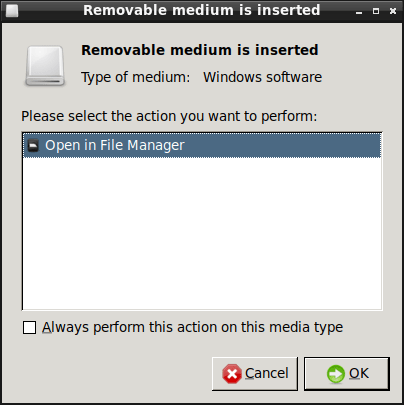
Keep Open in File Manager selected and click OK. The system will then open the USB flash drive directory, and users can access the files on the USB flash drive.
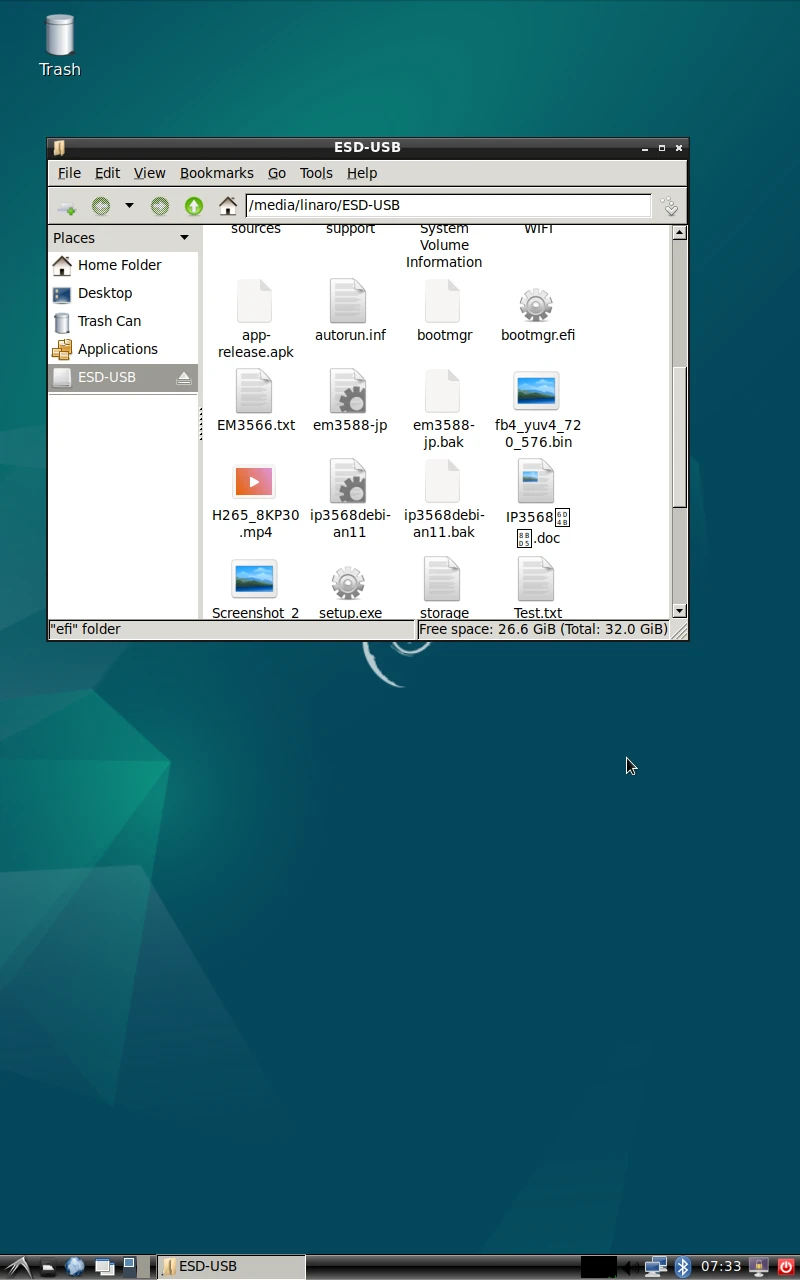
The current USB connection speed can be checked from the kernel log.
When the device operates in USB2.0 mode, the log usually shows high-speed.
When the device operates in USB3.0 mode, the log usually shows SuperSpeed.
1echo device > /sys/kernel/debug/usb/21500000.usb/mode
root@linaro-alip:/# echo device > /sys/kernel/debug/usb/21500000.usb/mode
[12144.179398] xhci-hcd xhci-hcd.1.auto: remove, state 4
[12144.179443] usb usb4: USB disconnect, device number 1
root@linaro-alip:/# [12144.180796] xhci-hcd xhci-hcd.1.auto: USB bus 4 deregistered
[12144.181207] xhci-hcd xhci-hcd.1.auto: remove, state 4
[12144.181239] usb usb3: USB disconnect, device number 1
[12144.182573] xhci-hcd xhci-hcd.1.auto: USB bus 3 deregistered
[12145.427080] read descriptors
[12145.427118] read strings
[12145.800547] dwc3 21500000.usb: device reset
[12145.887580] android_work: sent uevent USB_STATE=CONNECTED
[12145.918452] android_work: sent uevent USB_STATE=CONFIGURED
3.3.2 USB2.0 Host
The USB2.0 Host can connect peripherals such as mice, keyboards, and flash drives.
After a USB flash drive is inserted and recognized successfully, a removable media dialog box will pop up automatically.
Keep Open in File Manager selected and click OK. The system will then open the USB flash drive directory, and users can access the files on the USB flash drive.
3.4 Audio
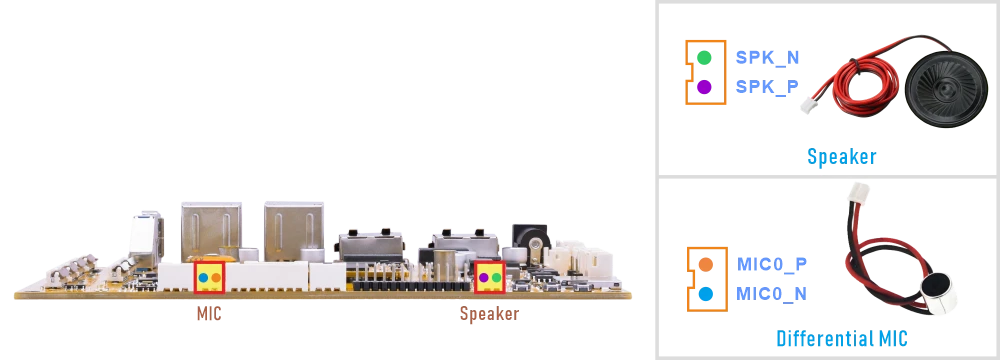
3.4.1 Audio Output
❶ Connect the Speaker to the connector (2-pin/2.0mm pitch)
❷ Set the DAC digital volume.
1amixer -c 0 cset name='DAC Digital Volume' 250,250
❸ Play the audio file.
Execute command according to the actual audio file path, eg. /media/linaro/F3AB-0FF3/video/music/2.wav
1aplay -D hw:0,0 /media/linaro/F3AB-0FF3/video/music/2.wav
3.4.2 Audio Input
- SBC1126B supports MIC recording and Loopback.
MIC recording captures outside sounds (e.g., voice) for storage, transmission, or voice commands.
Loopback captures the device’s own playback as a reference signal. It is primarily used for Acoustic Echo Cancellation (AEC) and audio monitoring. It is a tool for signal processing, not an audio recording of the environment.
❶ Connect the MIC to the connector (2-pin/2.0mm pitch).
❷ Execute the commands.
1amixer -c 0 cset name='SAI2 Receive PATH0 Source Select' 'From SDI0'   //Select MIC0 as the recording input source
2amixer -c 0 cset name='ACodec Digital Gain Volume' 100   //Set the audio codec digital gain
3arecord -D hw:0,0 -f cd -t wav test.wav   //Record audio from MIC0
4aplay -D hw:0,0 test.wav   //Play the recorded audio through the speaker
Serial terminal outputroot@linaro-alip:/# amixer -c 0 cset name='SAI2 Receive PATH0 Source Select' 'From SDI0' numid=29,iface=MIXER,name='SAI2 Receive PATH0 Source Select' ; type=ENUMERATED,access=rw------,values=1,items=4 ; Item #0 'From SDI0' ; Item #1 'From SDI1' ; Item #2 'From SDI2' ; Item #3 'From SDI3' : values=0 root@linaro-alip:/# amixer -c 0 cset name='ACodec Digital Gain Volume' 100 numid=44,iface=MIXER,name='ACodec Digital Gain Volume' ; type=INTEGER,access=rw---R--,values=1,min=0,max=127,step=0 : values=100 | dBscale-min=-95.00dB,step=0.75dB,mute=0 root@linaro-alip:/# root@linaro-alip:/# arecord -D hw:0,0 -f cd -t wav test.wav Recording WAVE 'test.wav' : Signed 16 bit Little Endian, Rate 44100 Hz, Stereo ^CAborted by signal Interrupt... root@linaro-alip:/# root@linaro-alip:/# aplay -D hw:0,0 test.wav Playing WAVE 'test.wav' : Signed 16 bit Little Endian, Rate 44100 Hz, Stereo
❶ Connect the MIC to the connector (2-pin/2.0mm pitch).
❷ Audio input configuration.
1amixer -c 0 cset name='SAI2 Receive PATH0 Source Select' 'From SDI0'   //recording input source
2amixer -c 0 cset name='SAI2 Receive PATH1 Source Select' 'From SDI1'   //Loopback reference input
❸ Record 4-channel audio.
1aplay -D hw:0,0 /media/linaro/F3AB-0FF3/video/music/2.wav & arecord -D hw:0,0 -f S16_LE -r 44100 -c 4 /test.wav
root@linaro-alip:/# amixer -c 0 cset name='SAI2 Receive PATH0 Source Select' 'From SDI0'
numid=29,iface=MIXER,name='SAI2 Receive PATH0 Source Select'0 Source Select' 'From SDI0'
  ; type=ENUMERATED,access=rw------,values=1,items=4
  ; Item #0 'From SDI0'
  ; Item #1 'From SDI1'
  ; Item #2 'From SDI2'
  ; Item #3 'From SDI3'
  : values=0  amixer -c 0 cset name='SAI2 Receive PATH1 Source Select' 'From SDI1'
numid=28,iface=MIXER,name='SAI2 Receive PATH1 Source Select'1 Source Select' 'From SDI1'
  ; type=ENUMERATED,access=rw------,values=1,items=4
  ; Item #0 'From SDI0'
  ; Item #1 'From SDI1'
  ; Item #2 'From SDI2'
  ; Item #3 'From SDI3'
  : values=1         aplay -D hw:0,0 /media/linaro/F3AB-0FF3/video/music/2.wav & arecord -D hw:0,0 -f S16_LE -r 44100 -c 4 /test.wav
[1] 2282aro-alip:/#  aplay -D hw:0,0 /media/linaro/F3AB-0FF3/video/music/2.wav & arecord -D hw:0,0 -f S16_LE -r 44100 -c 4 /test.wav
Recording WAVE '/test.wav' : Signed 16 bit Little Endian, Rate 44100 Hz, Channels 4
Playing WAVE '/media/linaro/F3AB-0FF3/video/music/2.wav' : Signed 16 bit Little Endian, Rate 44100 Hz, Stereo
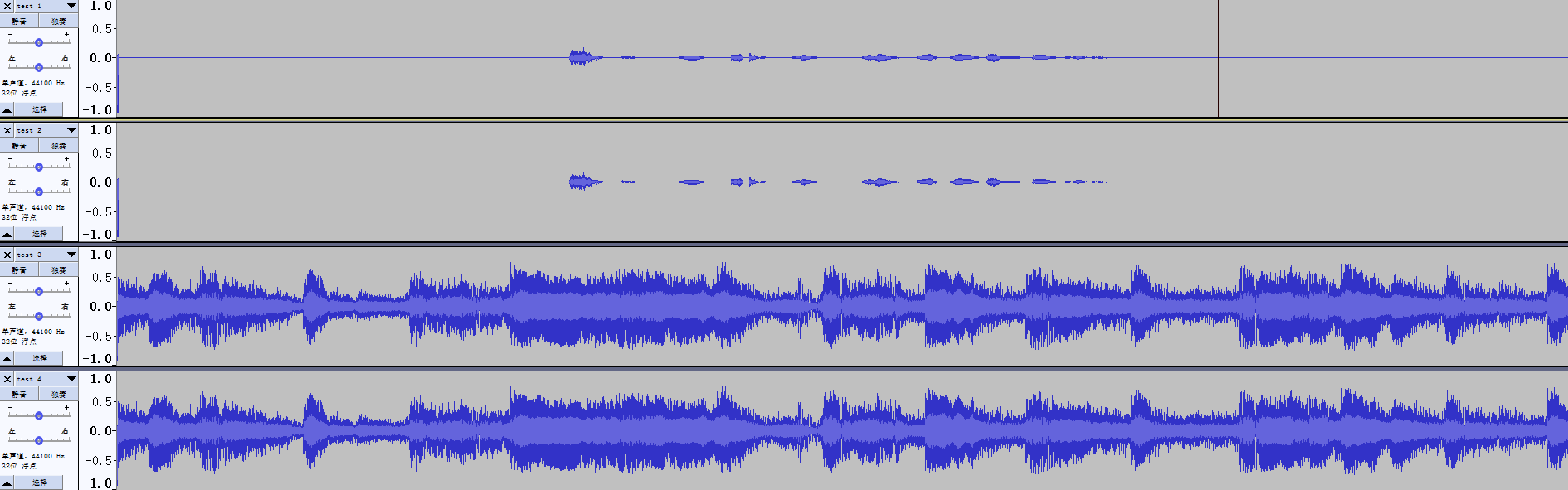
❹ Copy the recorded file to the PC and check the audio channels with audio software.
3.5 Ethernet
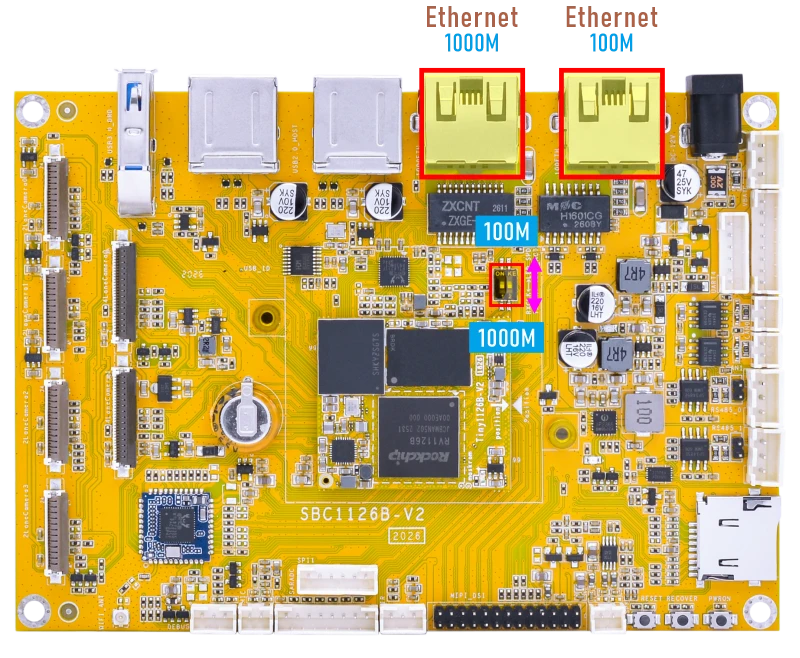
The 100M Ethernet and 1000M Ethernet interfaces on the SBC1126B are multiplexed and cannot be used at the same time. When switching between them, the corresponding firmware image must be updated in software, and the hardware selection must also be changed using the DIP switch on the development board.
DTS Configuration Switching Instructions File path kernel-6.1\arch\arm64\boot\dts\rockchip\boardcon-sbc1126b.dts
//#include "boardcon-sbc1126b-gephy.dtsi" //1000M
#include "boardcon-sbc1126b-fephy.dtsi"   //100M
#include "boardcon-sbc1126b-gephy.dtsi"    //1000M
//#include "boardcon-sbc1126b-fephy.dtsi"  //100M
3.5.1 100M Ethernet
❶ Connect the network cable to the 100M Ethernet port, and set the DIP switch to the 100M position.
root@linaro-alip:/#
[  447.452298] rk_gmac-dwmac 21c70000.ethernet end0: Link is Up - 100Mbps/Full - flow control rx/tx
[  447.452318] IPv6: ADDRCONF(NETDEV_CHANGE): end0: link becomes ready
❷ View the status of the network interface.
1ifconfig end0
root@linaro-alip:/# ifconfig end0
end0: flags=4163<UP,BROADCAST,RUNNING,MULTICAST>  mtu 1500
        inet 192.168.0.175  netmask 255.255.255.0  broadcast 192.168.0.255
        inet6 fe80::f0f0:b7ba:cb75:eaa  prefixlen 64  scopeid 0x20<link>
        ether 2e:cd:2f:8a:a1:64  txqueuelen 1000  (Ethernet)
        RX packets 40745  bytes 29660674 (28.2 MiB)
        RX errors 0  dropped 2195  overruns 0  frame 0
        TX packets 6682  bytes 428612 (418.5 KiB)
        TX errors 0  dropped 0 overruns 0  carrier 0  collisions 0
        device interrupt 79
❸ Test network connectivity.
1ping -I end0 www.armdesigner.com
root@linaro-alip:/# ping -I end0 www.armdesigner.com
PING d3dsoj86mhwkk6.cloudfront.net (18.64.122.52) from 192.168.0.175 end0: 56(84) bytes of data.
64 bytes from server-18-64-122-52.nrt12.r.cloudfront.net (18.64.122.52): icmp_seq=1 ttl=242 time=163 ms
64 bytes from server-18-64-122-52.nrt12.r.cloudfront.net (18.64.122.52): icmp_seq=2 ttl=242 time=163 ms
64 bytes from server-18-64-122-52.nrt12.r.cloudfront.net (18.64.122.52): icmp_seq=3 ttl=242 time=163 ms
64 bytes from server-18-64-122-52.nrt12.r.cloudfront.net (18.64.122.52): icmp_seq=4 ttl=242 time=163 ms
64 bytes from server-18-64-122-52.nrt12.r.cloudfront.net (18.64.122.52): icmp_seq=5 ttl=242 time=162 ms
64 bytes from server-18-64-122-52.nrt12.r.cloudfront.net (18.64.122.52): icmp_seq=6 ttl=242 time=163 ms
^C
--- d3dsoj86mhwkk6.cloudfront.net ping statistics ---
7 packets transmitted, 6 received, 14.2857% packet loss, time 14406ms
rtt min/avg/max/mdev = 162.277/162.577/162.765/0.157 ms
3.5.2 1000M Ethernet
❶ Connect the network cable to the 1000M Ethernet port, and set the DIP switch to the 1000M position.
root@linaro-alip:/#
[   58.028698] rk_gmac-dwmac 21c70000.ethernet end0: Link is Up - 1Gbps/Full - flow control rx/tx
[   58.028767] IPv6: ADDRCONF(NETDEV_CHANGE): end0: link becomes ready
❷ View the status of the network interface.
1ifconfig end0
❸ Test network connectivity.
1ping -I end0 www.armdesigner.com
3.6 SD Card
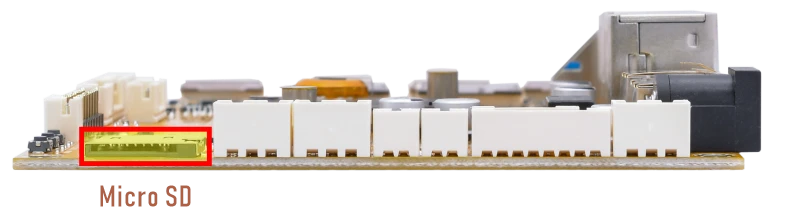
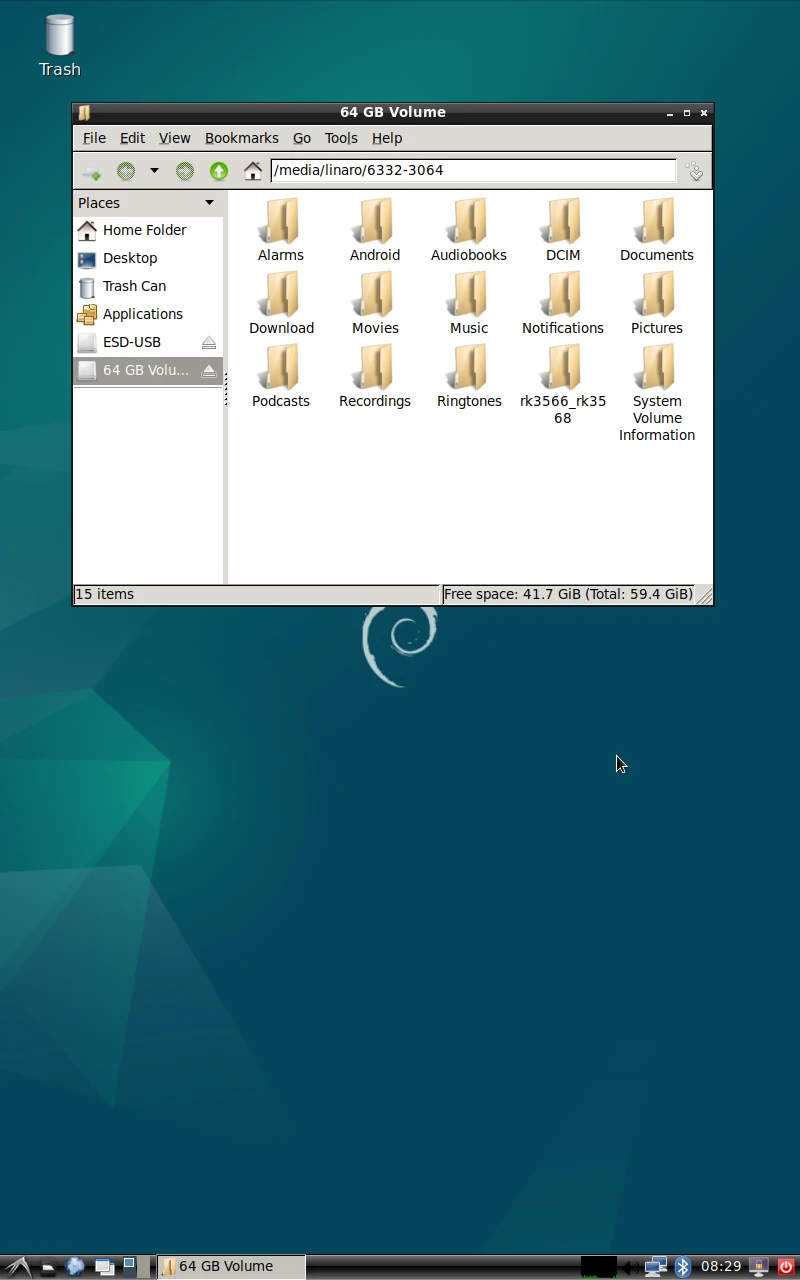
After the micro SD card is inserted and recognized successfully, a removable media dialog box will pop up automatically.
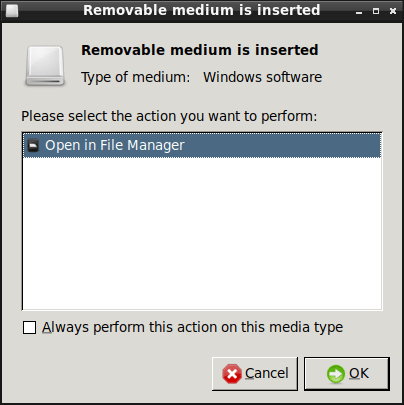
Keep Open in File Manager selected and click OK. The system will then open the micro SD card directory, and users can access the files on the micro SD card.
3.7 WiFi & Bluetooth
3.7.1 WiFi
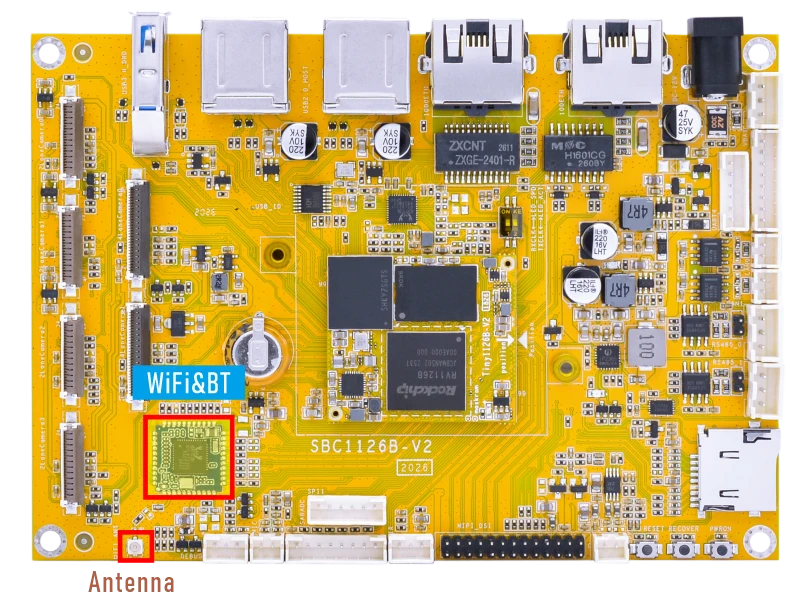
❶ Connect the WiFi antenna.
❷ Click the network icon in the bottom-right corner of the UI interface.
❸ Select the SSID from the list of available networks and enter the password.
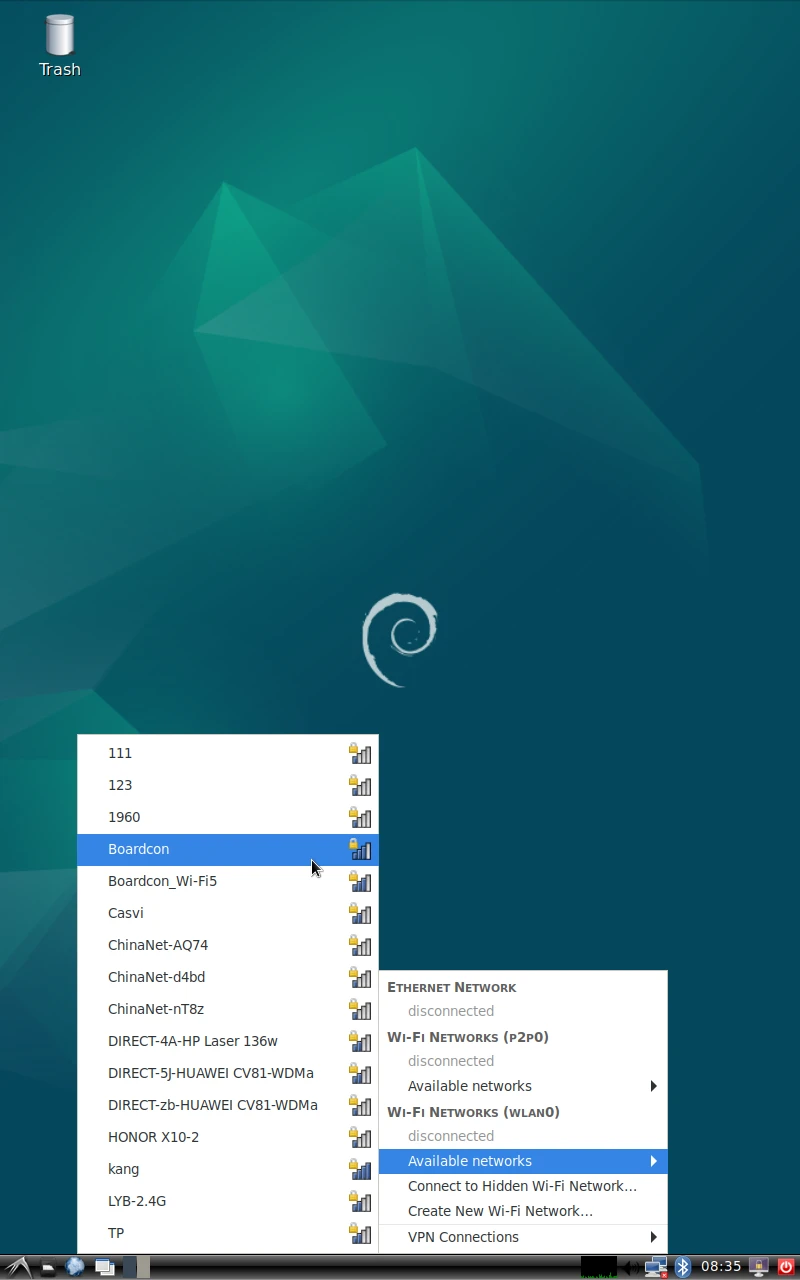
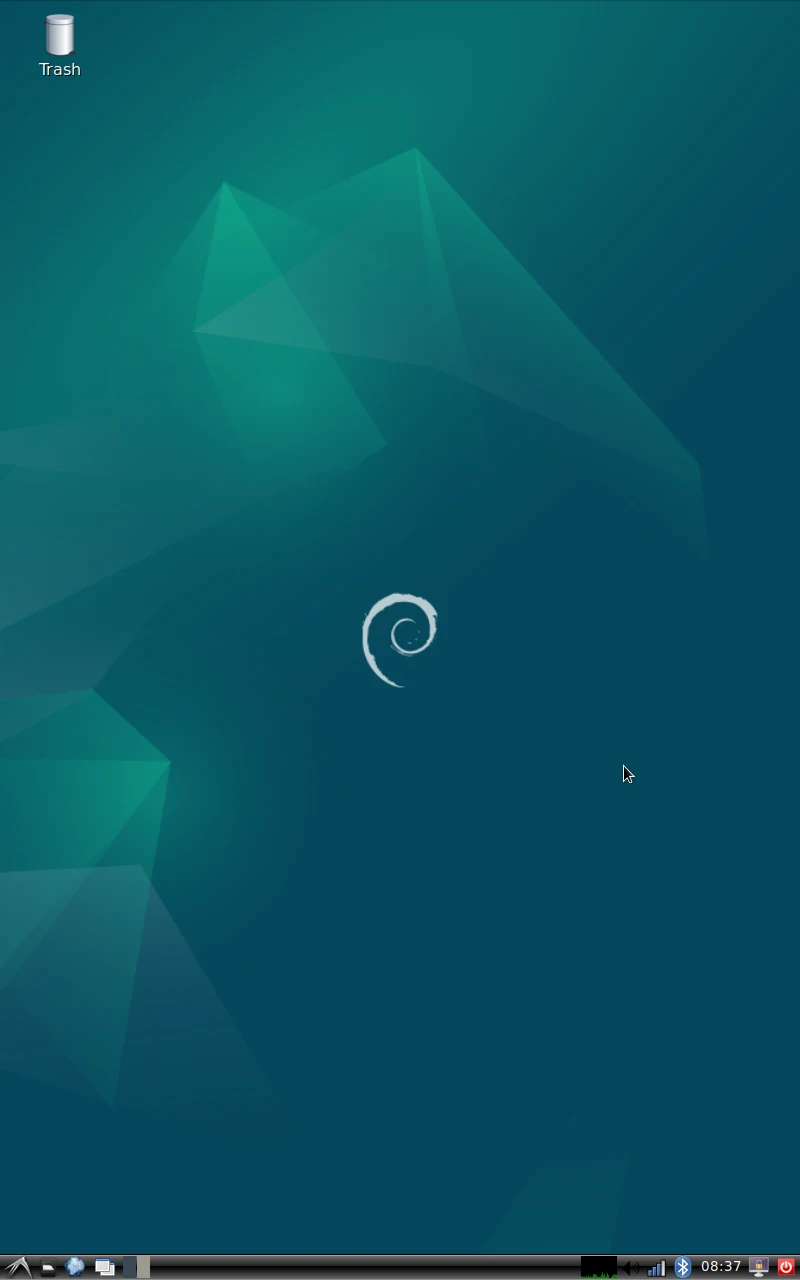
❹ After connected, user can open Browser or ping URL/IP at terminal to test network.
1ifconfig
2ping -I wlan0 www.armdesigner.com
3.7.2 Bluetooth
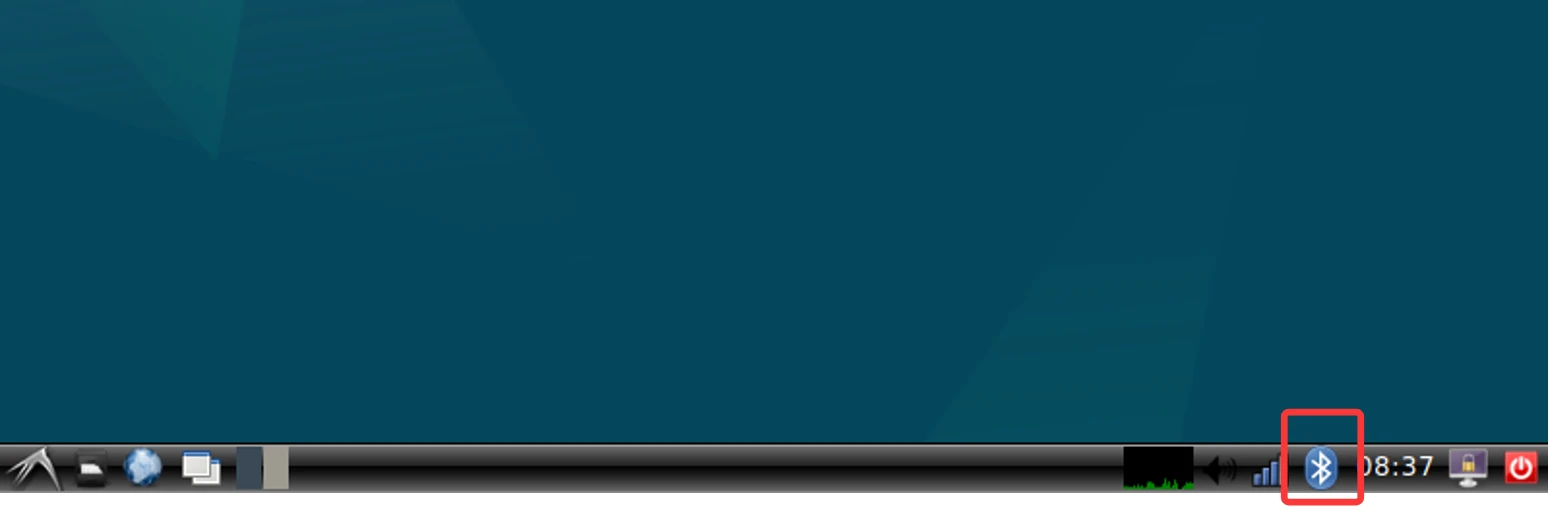
❶ Click the Bluetooth icon in the bottom right corner of the UI interface.
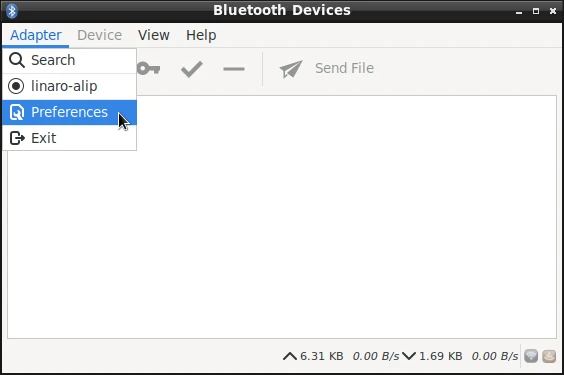
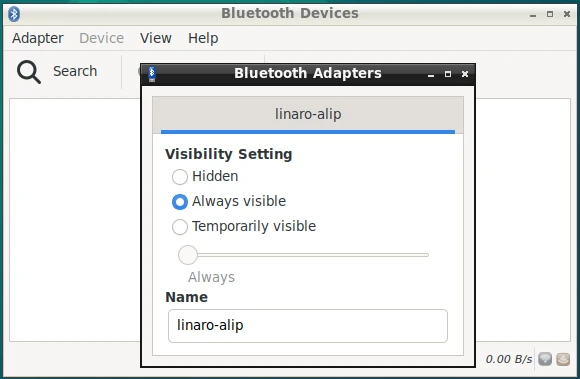
❷ The Bluetooth device name is hidden by default. Set the Bluetooth device name to be visible. Click Adapter -> Preferences -> Always visible
❸ Click Search to start searching and select the available device in the list to pair.
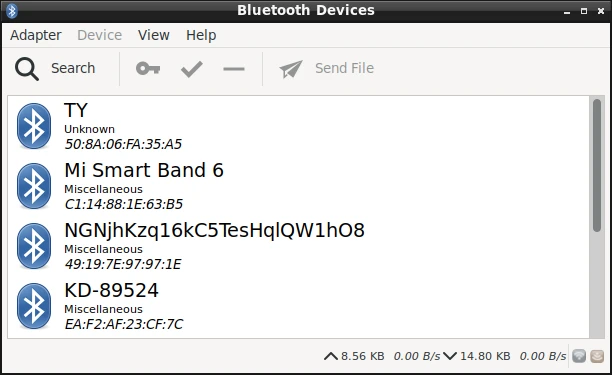
After pairing, devices can connect with each other automatically.
3.8 IR

❶ Connect the IR receiver.
❷ Open IR debugging print.
1echo 1 > /sys/module/rockchip_pwm_remotectl/parameters/code_print
❸ Press remote button, key value printed to log.
root@linaro-alip:/# echo 1 > /sys/module/rockchip_pwm_remotectl/parameters/code_print
root@linaro-alip:/#
[ 1274.657882] USERCODE=0xc00
[ 1274.683832] RMC_GETDATA=33
[ 1276.005540] USERCODE=0x1818
[ 1276.032607] RMC_GETDATA=99
[ 1276.492593] USERCODE=0xc00
[ 1276.517441] RMC_GETDATA=32
[ 1276.983249] USERCODE=0x300
[ 1278.009855] USERCODE=0xc001
[ 1278.238809] USERCODE=0x1
[ 1278.392047] USERCODE=0x1818
3.9 RS485
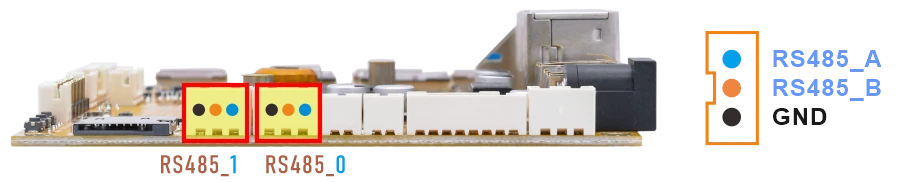
❶ Connect PC and board with USB-to-RS485 adapter.
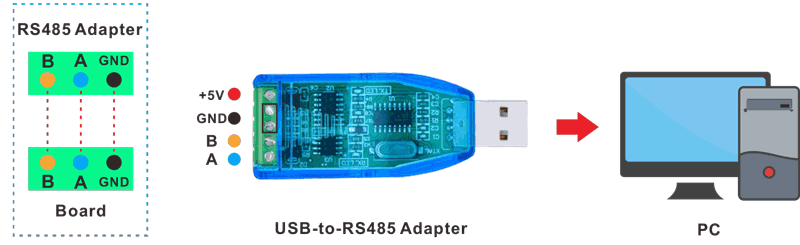
RS485 connection
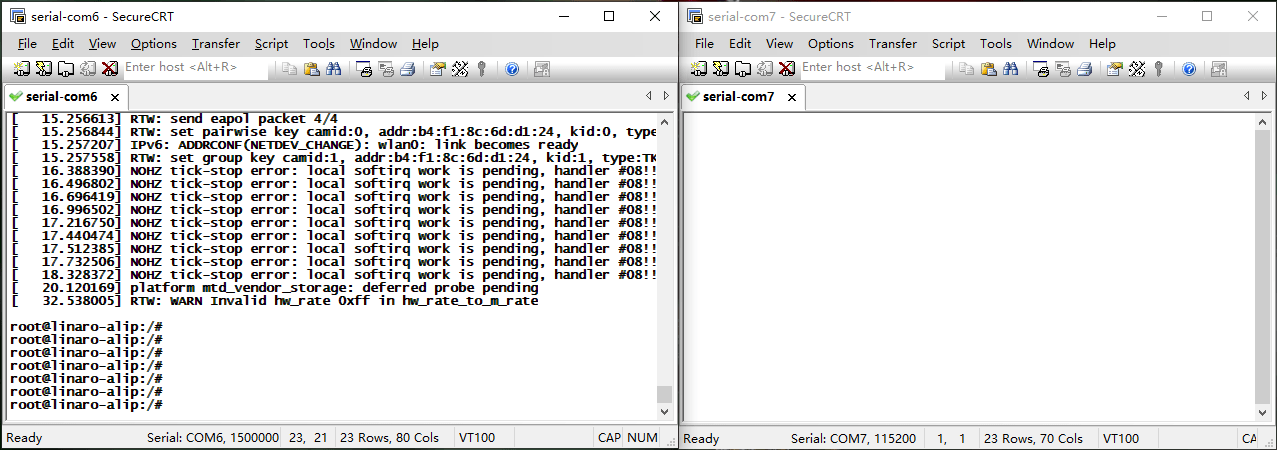
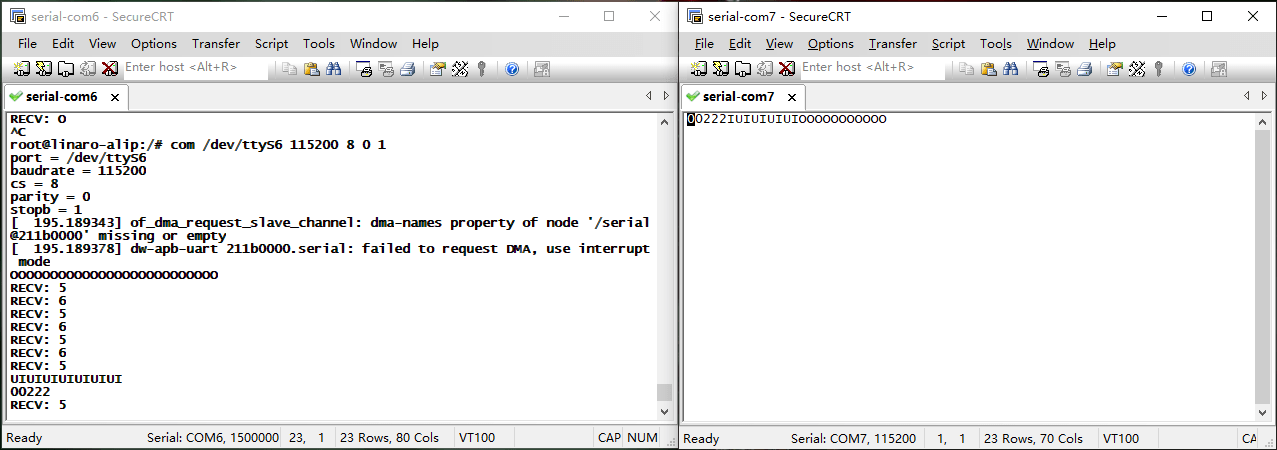
❷ Open two serial terminal windows. Set the debug serial port baud rate to 1500000, and set the RS485 serial port baud rate to 115200.
❸ Execute command on the terminal serial port of board.
1com /dev/ttyS5 115200 8 0 1 //RS485_0
❹ Input character to test RS485 communication.
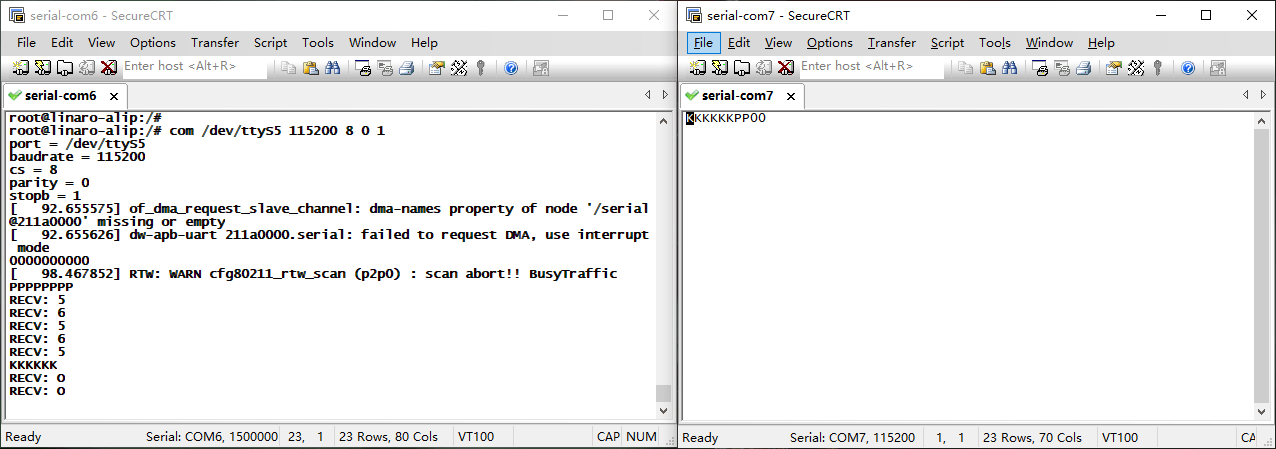
❺ Press Ctrl + C to exit RS485_0 testing.
❻ Test RS485_1.
1com /dev/ttyS6 115200 8 0 1
3.10 UART
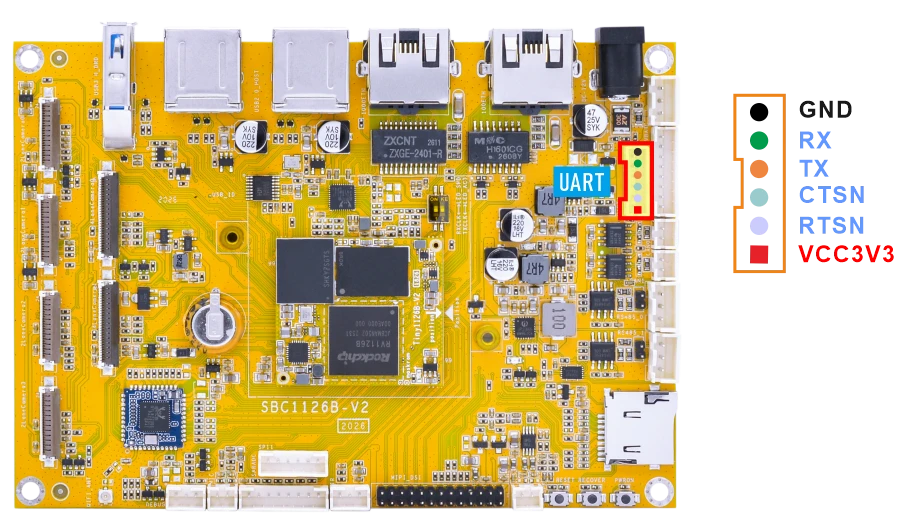
❶ Connect RX and TX of UART.
❷ Execute command and input character to test.
1com /dev/ttyS4 115200 8 0 1
root@linaro-alip:/# com /dev/ttyS4 115200 8 0 1
port = /dev/ttyS4
baudrate = 115200
cs = 8
parity = 0
stopb = 1
12345678
RECV: 12345678
abcdefg
RECV: abcdefg
3.11 CAN
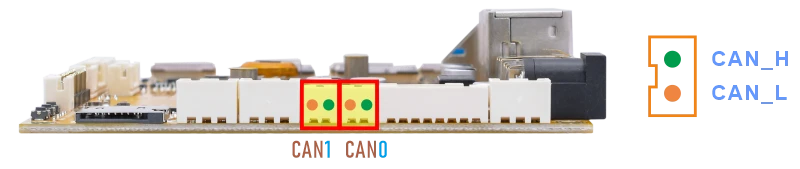
❶ Connect PC and board with USB-to-CAN adapter.
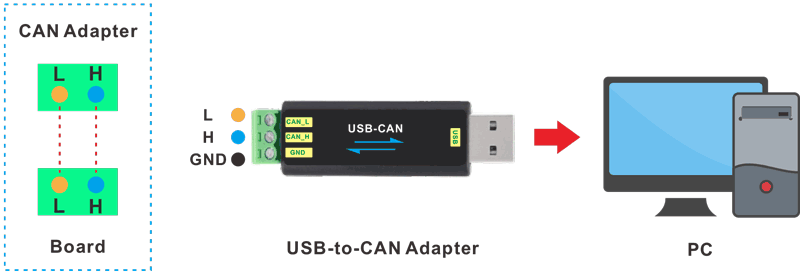
CAN connection
❷ Open the CAN application and set the baudrate to 500000 on PC.
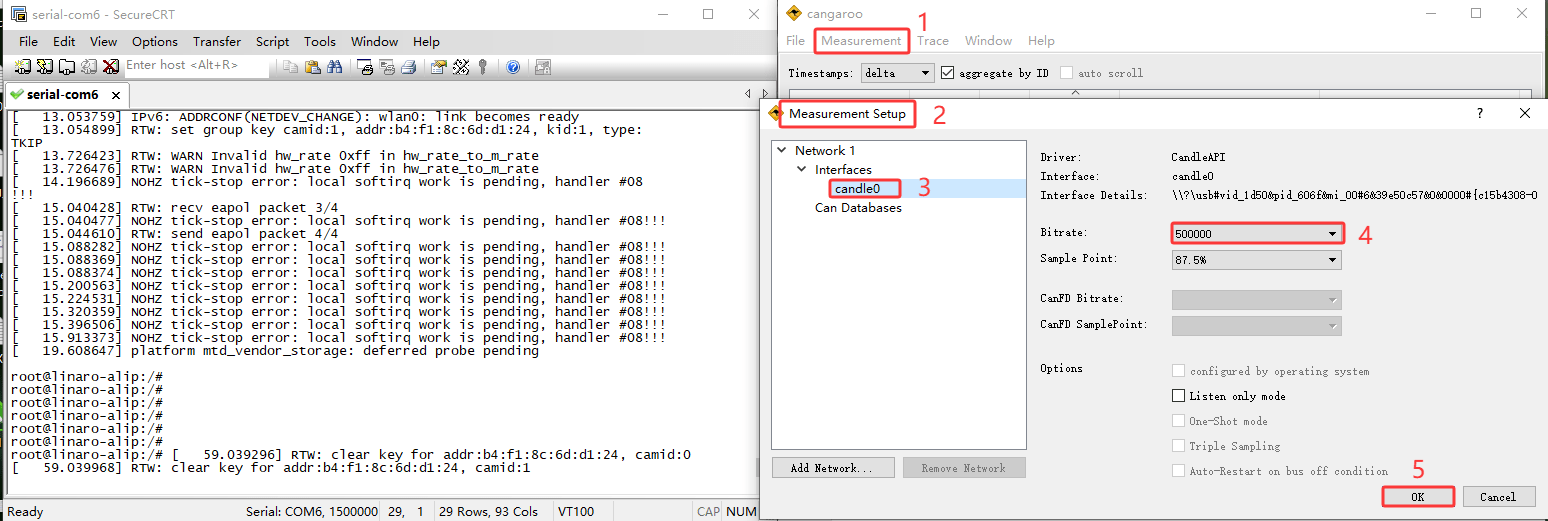
❸ Configure and enable the CAN0 on the board with a bitrate of 500000.
1ip link set can0 down
2ip link set can0 type can bitrate 500000
3ip link set can0 up
❹ Configure CAN0 as receiver.
1candump can0
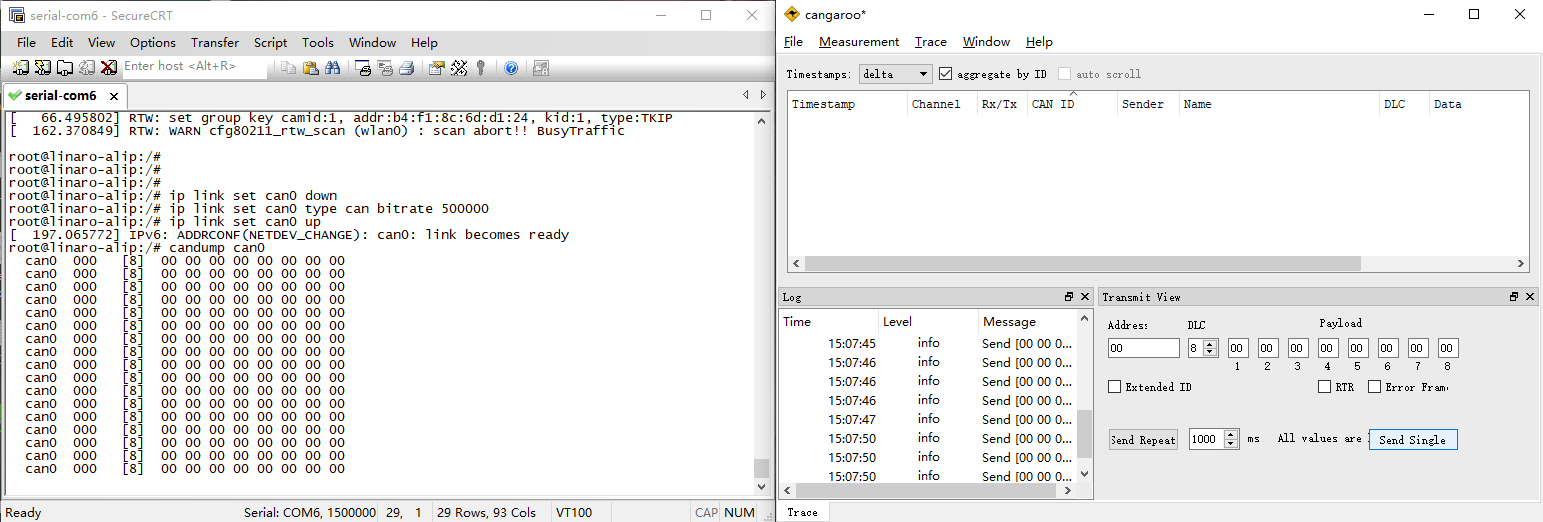
❺ Set CAN0 as Transmitter.
1cansend can0 123#DEADBEEFDEADBEEF
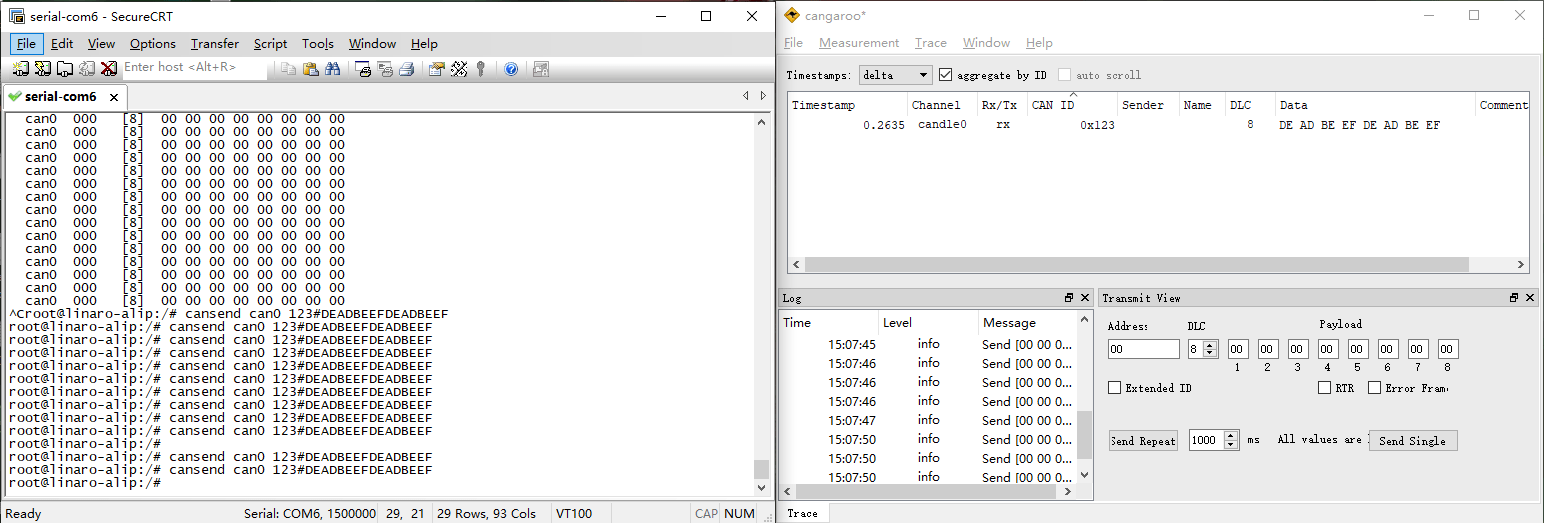
The tests for CAN1 are similar to those for CAN0. Simply replace can0 with can1.
3.12 SPI
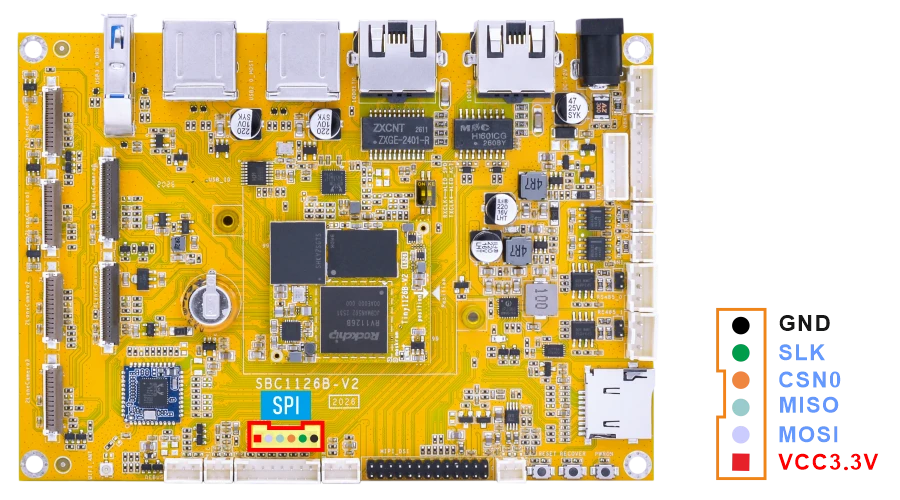
❶ Connect MOSI and MISO of SPI.
❷ SPI loopback test.
1test_spi 1 0
root@linaro-alip:/# test_spi 1 0
device= /dev/spidev1.0
spi mode: 0
bits per word: 8
max speed: 5000000 Hz (5000 KHz)

FF FF FF FF FF FF
40 00 00 00 00 95
FF FF FF FF FF FF
FF FF FF FF FF FF
FF FF FF FF FF FF
DE AD BE EF BA AD
F0 0D
3.13 ADC
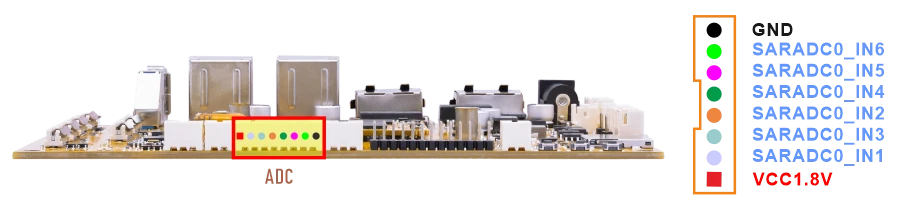
Connect the ADC pin to two different voltage levels within 0~1.8V respectively. For each level, after setting the pin to that level, execute the test command.
1cat /sys/bus/iio/devices/iio:\device0/in_voltage1_raw //test ADC1
root@linaro-alip:/# cat /sys/bus/iio/devices/iio:\device0/in_voltage1_raw
8191
root@linaro-alip:/# cat /sys/bus/iio/devices/iio:\device0/in_voltage1_raw
7
For other ADC read commands, refer to the ADC read command description below.
1cat /sys/bus/iio/devices/iio:\device0/in_voltage1_raw   //ADC1
2cat /sys/bus/iio/devices/iio:\device0/in_voltage2_raw   //ADC2
3cat /sys/bus/iio/devices/iio:\device0/in_voltage3_raw   //ADC3
4cat /sys/bus/iio/devices/iio:\device0/in_voltage4_raw   //ADC4
5cat /sys/bus/iio/devices/iio:\device0/in_voltage5_raw   //ADC5
6cat /sys/bus/iio/devices/iio:\device0/in_voltage6_raw   //ADC6
1for i in 1 2 3 4 5 6; do
2    echo -n "ADC$i: "
3    cat /sys/bus/iio/devices/iio:\device0/in_voltage${i}_raw
4done
3.14 RTC
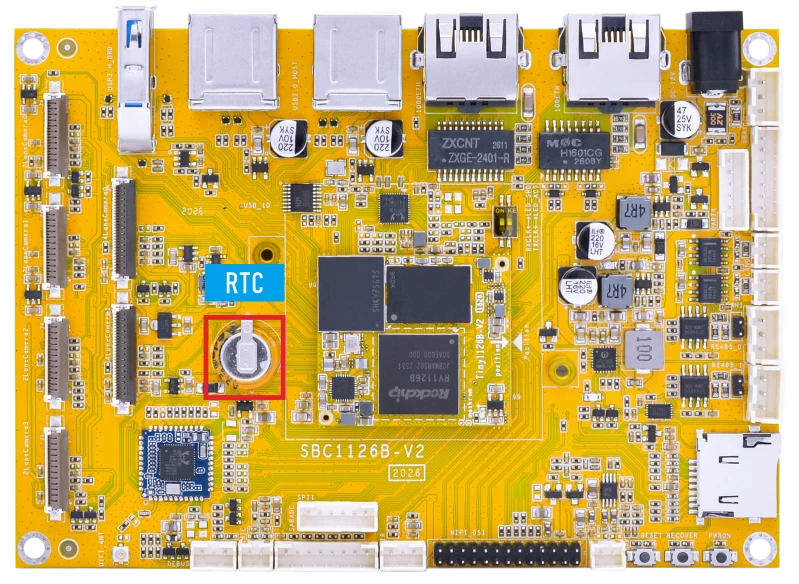
The RTC on the SBC1126B is powered by a supercapacitor.
❶ Set the system time manually.
1date -s "2026-06-17 17:56:00"
If the network is connected, the system time may be synchronized automatically to the current UTC time.
❷ Set the hardware clock to current system time.
1hwclock -w
❸ Display date and time.
1hwclock
❹ Power off the board and disconnect the main power supply. Wait for a period of time, then power on the board again.
❺ Read the hardware clock time again.
1hwclock
If the RTC is working properly, the hardware clock time should be retained and continue running after power-off.
3.15 Battery Supply
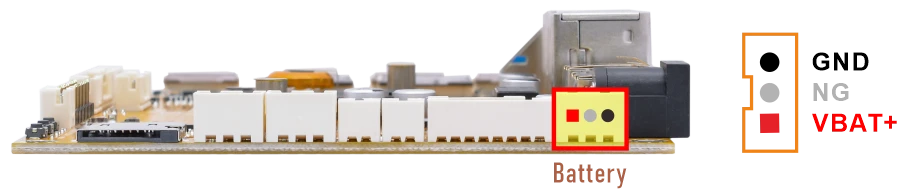
❶ Connect the Li-ion battery(7.4V) to the BAT connector, then press and hold the power button to turn on the board.
❷ Read the current battery capacity percentage.
1cat /sys/class/power_supply/cw221X-bat/capacity
❸ Read the current battery voltage.
1cat /sys/class/power_supply/cw221X-bat/voltage_now
3.16 Camera
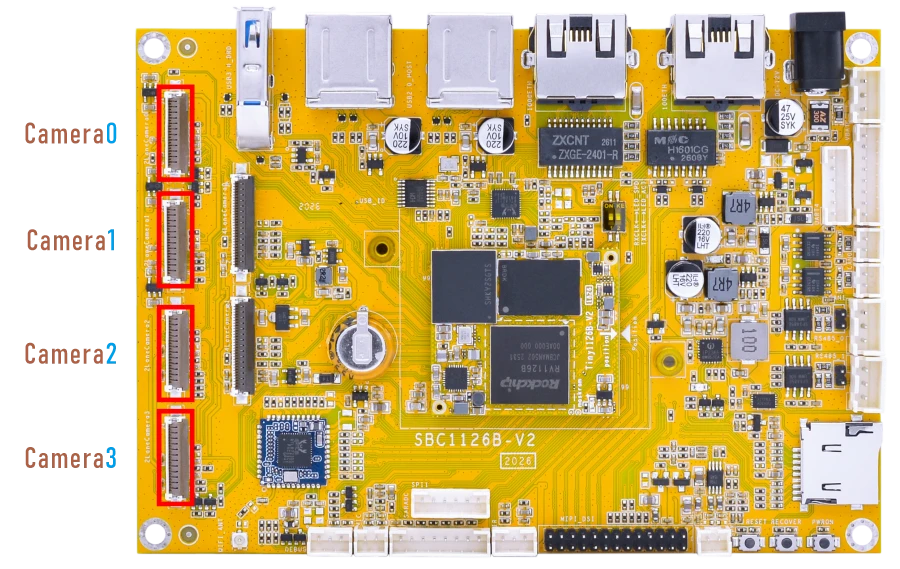
The SBC1126B provides six MIPI CSI camera interfaces, including four 2-lane MIPI CSI interfaces and two 4-lane MIPI CSI interfaces.
The 2-lane and 4-lane MIPI CSI camera modes are mutually exclusive and cannot be used simultaneously. Different camera modes require corresponding hardware configurations and firmware images.
The default camera sensors are as follows:
2-lane MIPI CSI camera: SC200AI.
4-lane MIPI CSI camera: IMX415.
To enable 4-lane cameras, remove the following resistors on the back side of the board:
Camera0: R5/R10/R11/R21/R22/R26/R31/R37/R39/R46
Camera1: R58/R60/R62/R63/R64/R65/R67/R68/R69/R70
3.16.1 2-lane Camera
❶ Connect the camera to the board and power on.
❷ Check the camera preview device nodes.
1grep "" /sys/class/video4linux/v*/name | grep mainpath
root@linaro-alip:/# grep "" /sys/class/video4linux/v*/name | grep mainpath
/sys/class/video4linux/video44/name:rkisp_mainpath
/sys/class/video4linux/video52/name:rkisp_mainpath
/sys/class/video4linux/video60/name:rkisp_mainpath
/sys/class/video4linux/video68/name:rkisp_mainpath
❸ Preview camera.
1gst-launch-1.0 v4l2src device=/dev/video44 ! video/x-raw,format=NV16,width=1920,height=1080, framerate=25/1 ! kmssink
root@linaro-alip:/# gst-launch-1.0 v4l2src device=/dev/video44 ! video/x-raw,format=NV16,width=1920,height=1080, framerate=25/1 ! kmssink
mpp[3153]: mpp_info: mpp version: 520ab553 author: Herman Chen   2025-12-16 fix[sys_cfg]: Fix decoder sys_cfg crashamerate=25/1 ! kmssink
mpp[3153]: mpp_info: mpp version: 520ab553 author: Herman Chen   2025-12-16 fix[sys_cfg]: Fix decoder sys_cfg crash
mpp[3153]: mpp_info: mpp version: 520ab553 author: Herman Chen   2025-12-16 fix[sys_cfg]: Fix decoder sys_cfg crash
mpp[3153]: mpp: unable to create enc vp8 for soc rv1126b unsupported
mpp[3153]: mpp_info: mpp version: 520ab553 author: Herman Chen   2025-12-16 fix[sys_cfg]: Fix decoder sys_cfg crash
[  163.521393] rkvpss-offline: CLK_CORE_VPSS set to 396000000 Hz (requested 400000000 Hz)
[  164.273559] rkvpss-offline: CLK_CORE_VPSS set to 396000000 Hz (requested 400000000 Hz)
Setting pipeline to PAUSED ...
Using mplane plugin for capture
Pipeline is live and does not need PREROLL ...
        Pipeline is PREROLLED ...
Setting pipeline to PLAYING ...
New clock: GstSystemClock
[  164.353646] rkisp_hw 21d00000.isp: set isp clk = 297000000Hz
[  164.355762] rkcif-mipi-lvds: stream[0] start streaming
[  164.356019] rockchip-mipi-csi2 mipi0-csi2: stream on, src_sd: 00000000860eb766, sd_name:rockchip-csi2-dphy1
[  164.356040] rockchip-mipi-csi2 mipi0-csi2: stream ON
[  164.356088] rockchip-csi2-dphy1: dphy1, data_rate_mbps 742
[  164.356117] rockchip-csi2-dphy csi2-dphy1: csi2_dphy_s_stream stream on:1, dphy1, ret 0
[  164.356130] sc200ai 5-0030: 1920x1080@10, mode 0, vts 0x1a5e
Redistribute latency...
0:00:27.0 / 99:99:99
1gst-launch-1.0 v4l2src device=/dev/video52 ! video/x-raw,format=NV16,width=1920,height=1080, framerate=25/1 ! kmssink
root@linaro-alip:/# gst-launch-1.0 v4l2src device=/dev/video52 ! video/x-raw,format=NV16,width=1920,height=1080, framerate=25/1 ! kmssink
[  254.595943] rkvpss-offline: CLK_CORE_VPSS set to 396000000 Hz (requested 400000000 Hz)width=1920,height=1080, framerate=25/1 ! kmssink
Setting pipeline to PAUSED ...
Using mplane plugin for capture
Pipeline is live and does not need PREROLL ...
Pipeline is PREROLLED ...
Setting pipeline to PLAYING ...
New clock: GstSystemClock
[  254.673186] rkisp_hw 21d00000.isp: set isp clk = 297000000Hz
[  254.675289] rkcif-mipi-lvds1: stream[0] start streaming
[  254.675555] rockchip-mipi-csi2 mipi1-csi2: stream on, src_sd: 00000000a0550fb3, sd_name:rockchip-csi2-dphy2
[  254.675578] rockchip-mipi-csi2 mipi1-csi2: stream ON
[  254.675626] rockchip-csi2-dphy2: dphy2, data_rate_mbps 742
[  254.675658] rockchip-csi2-dphy csi2-dphy2: csi2_dphy_s_stream stream on:1, dphy2, ret 0
[  254.675670] sc200ai 3-0030: 1920x1080@10, mode 0, vts 0x1a5e
Redistribute latency...
0:00:14.8 / 99:99:99.
1gst-launch-1.0 v4l2src device=/dev/video60 ! video/x-raw,format=NV16,width=1920,height=1080, framerate=25/1 ! kmssink
1gst-launch-1.0 v4l2src device=/dev/video68 ! video/x-raw,format=NV16,width=1920,height=1080, framerate=25/1 ! kmssink
3.16.2 4-lane Camera
Verify that the resistors on the back of the development board have been removed.
❶ Connect the camera to the board and power on.
❷ Check the camera preview device nodes.
1grep "" /sys/class/video4linux/v*/name | grep mainpath
root@linaro-alip:/# grep "" /sys/class/video4linux/v*/name | grep mainpath
/sys/class/video4linux/video22/name:rkisp_mainpath
/sys/class/video4linux/video30/name:rkisp_mainpath
❸ Preview camera.
1gst-launch-1.0 v4l2src device=/dev/video22 ! video/x-raw,format=NV16,width=1920,height=1080, framerate=25/1 ! kmssink
root@linaro-alip:/# gst-launch-1.0 v4l2src device=/dev/video22 ! video/x-raw,format=NV16,width=1920,height=1080, framerate=25/1 ! kmssink
mpp[2810]: mpp_info: mpp version: 520ab553 author: Herman Chen   2025-12-16 fix[sys_cfg]: Fix decoder sys_cfg crash
mpp[2810]: mpp_info: mpp version: 520ab553 author: Herman Chen   2025-12-16 fix[sys_cfg]: Fix decoder sys_cfg crash
mpp[2810]: mpp_info: mpp version: 520ab553 author: Herman Chen   2025-12-16 fix[sys_cfg]: Fix decoder sys_cfg crash
mpp[2810]: mpp: unable to create enc vp8 for soc rv1126b unsupported
mpp[2810]: mpp_info: mpp version: 520ab553 author: Herman Chen   2025-12-16 fix[sys_cfg]: Fix decoder sys_cfg crash
[  136.071560] dw9714 3-000c: cmd 0x80685600 not supported
[  136.071966] dw9714 4-000c: cmd 0x80685600 not supported
[  136.073094] rkvpss-offline: CLK_CORE_VPSS set to 396000000 Hz (requested 400000000 Hz)
[  136.882136] dw9714 3-000c: cmd 0x80685600 not supported
[  136.882543] dw9714 4-000c: cmd 0x80685600 not supported
[  136.883600] rkvpss-offline: CLK_CORE_VPSS set to 396000000 Hz (requested 400000000 Hz)
Setting pipeline to PAUSED ...
Using mplane plugin for capture
Pipeline is live and does not need PREROLL ...
Pipeline is PREROLLED ...
Setting pipeline to PLAYING ...
New clock: GstSystemClock
[  136.924957] rkisp_hw 21d00000.isp: set isp clk = 500000000Hz
[  136.933048] rkcif-mipi-lvds: stream[0] start streaming
[  136.933358] rockchip-mipi-csi2 mipi0-csi2: stream on, src_sd: 00000000b41f24de, sd_name:rockchip-csi2-dphy0
[  136.933379] rockchip-mipi-csi2 mipi0-csi2: stream ON
[  136.933430] rockchip-csi2-dphy0: dphy0, data_rate_mbps 892
[  136.933461] rockchip-csi2-dphy csi2-dphy0: csi2_dphy_s_stream stream on:1, dphy0, ret 0
[  136.933474] imx415 3-0036: s_stream: 1. 3864x2192, hdr: 0, bpp: 10
[  136.996685] rkcif-mipi-lvds: Warning: vblank need >= 1000us if isp work in online, cur 859 us
[  137.031602] rkcif-mipi-lvds: Warning: vblank need >= 1000us if isp work in online, cur 859 us
Redistribute latency...
0:00:18.8 / 99:99:99.
1gst-launch-1.0 v4l2src device=/dev/video30 ! video/x-raw,format=NV16,width=1920,height=1080, framerate=25/1 ! kmssink
root@linaro-alip:/# gst-launch-1.0 v4l2src device=/dev/video30 ! video/x-raw,format=NV16,width=1920,height=1080, framerate=25/1 ! kmssink
[  191.275396] dw9714 3-000c: cmd 0x80685600 not supported
[  191.275791] dw9714 4-000c: cmd 0x80685600 not supported
[  191.276902] rkvpss-offline: CLK_CORE_VPSS set to 396000000 Hz (requested 400000000 Hz)
Setting pipeline to PAUSED ...
Using mplane plugin for capture
Pipeline is live and does not need PREROLL ...
Pipeline is PREROLLED ...
Setting pipeline to PLAYING ...
New clock: GstSystemClock
[  191.315397] rkisp_hw 21d00000.isp: set isp clk = 500000000Hz
[  191.322631] rkcif-mipi-lvds2: stream[0] start streaming
[  191.322920] rockchip-mipi-csi2 mipi2-csi2: stream on, src_sd: 00000000777712d6, sd_name:rockchip-csi2-dphy3
[  191.322941] rockchip-mipi-csi2 mipi2-csi2: stream ON
[  191.322987] rockchip-csi2-dphy3: dphy3, data_rate_mbps 892
[  191.323016] rockchip-csi2-dphy csi2-dphy3: csi2_dphy_s_stream stream on:1, dphy3, ret 0
[  191.323028] imx415 4-0036: s_stream: 1. 3864x2192, hdr: 0, bpp: 10
[  191.428759] rkcif-mipi-lvds2: Warning: vblank need >= 1000us if isp work in online, cur 859 us
[  191.463657] rkcif-mipi-lvds2: Warning: vblank need >= 1000us if isp work in online, cur 859 us
Redistribute latency...
0:00:11.4 / 99:99:99.
3.17 Video Playback
3.17.1 Built-in Script
The script instruction directory is in /rockchip-test/video/, just run it.
root@linaro-alip:/# /rockchip-test/video/test_gst_video.sh
[  130.441969] dw9714 3-000c: cmd 0x80685600 not supported
[  130.442393] dw9714 4-000c: dw9714_set_power(1046) on(1)
[  130.479174] dw9714 4-000c: cmd 0x80685600 not supported
[  130.502451] dw9714 4-000c: dw9714_set_power(1046) on(0)
[  130.504096] rkvpss-offline: CLK_CORE_VPSS set to 396000000 Hz (requested 400000000 Hz)
Setting pipeline to PAUSED ...
Pipeline is PREROLLING ...
Redistribute latency...
mpp[2161]: mpp_info: mpp version: 520ab553 author: Herman Chen   2025-12-16 fix[sys_cfg]: Fix decoder sys_cfg crash
mpp[2161]: mpp_info: mpp version: 520ab553 author: Herman Chen   2025-12-16 fix[sys_cfg]: Fix decoder sys_cfg crash
mpp[2161]: mpp_info: mpp version: 520ab553 author: Herman Chen   2025-12-16 fix[sys_cfg]: Fix decoder sys_cfg crash
mpp[2161]: mpp: unable to create enc vp8 for soc rv1126b unsupported
mpp[2161]: mpp_info: mpp version: 520ab553 author: Herman Chen   2025-12-16 fix[sys_cfg]: Fix decoder sys_cfg crash
mpp[2161]: mpp_info: mpp version: 520ab553 author: Herman Chen   2025-12-16 fix[sys_cfg]: Fix decoder sys_cfg crash
Redistribute latency...
mpp[2161]: h264d_api: is_avcC=1
mpp[2161]: mpp_buf_slot: mismatch h_stride_by_pixel 1472 - 1280
mpp[2161]: mpp_buf_slot: mismatch h_stride_by_byte 1472 - 1280
mpp[2161]: mpp_buf_slot: mismatch size_total 1589760 - 1843200
mpp[2161]: mpp_buf_slot: mismatch h_stride_by_pixel 1472 - 1280
mpp[2161]: mpp_buf_slot: mismatch h_stride_by_byte 1472 - 1280
mpp[2161]: mpp_buf_slot: mismatch size_total 1589760 - 1843200
Pipeline is PREROLLED ...
Prerolled, waiting for async message to finish...
Setting pipeline to PLAYING ...
Redistribute latency...
New clock: GstSystemClock
0:00:02.9 / 0:00:29.5 (10.0 %)
3.17.2 Command Line
1export GST_MPP_VIDEODEC_DEFAULT_ARM_AFBC=1
2gst-play-1.0 --flags=3 --videosink="kmssink plane-id=74" /media/linaro/F3AB-0FF3/video/4KP30/4K30P-BLACKPINK-DDU-DU_DDU-DU.mp4 --audiosink="alsasink device=hw:0,0"
Command explanation:
export GST_MPP_VIDEODEC_DEFAULT_ARM_AFBC=1: Open AFBC.--videosink="kmssink plane-id=74": Specifies the plane. Which can be viewed using the command cat /sys/kernel/debug/dri/0/state | grep “plane[”/media/linaro/F3AB-0FF3/video/4KP30/4K30P-BLACKPINK-DDU-DU_DDU-DU.mp4: The media file path to be played.--audiosink="alsasink device=hw:0,0": Specifies the audio output device as hw:0,0.
root@linaro-alip:/# export GST_MPP_VIDEODEC_DEFAULT_ARM_AFBC=1         gst-play-1.0 --flags=3 --videosink="kmssink plane-id=74" /media/linaro/F3AB-0FF3/video/4KP30/4K30P-BLACKPINK-DDU-DU_DDU-DU.mp4 --audiosink="alsasink device=hw:0,0"INK-DDU-DU_DDU-DU.mp4 --audiosink="alsasink device=hw:0,0"
Press 'k' to see a list of keyboard shortcuts.
Now playing /media/linaro/F3AB-0FF3/video/4KP30/4K30P-BLACKPINK-DDU-DU_DDU-DU.mp4
Redistribute latency...
mpp[2887]: mpp_info: mpp version: 520ab553 author: Herman Chen   2025-12-16 fix[sys_cfg]: Fix decoder sys_cfg crash
mpp[2887]: mpp_info: mpp version: 520ab553 author: Herman Chen   2025-12-16 fix[sys_cfg]: Fix decoder sys_cfg crash
mpp[2887]: mpp_info: mpp version: 520ab553 author: Herman Chen   2025-12-16 fix[sys_cfg]: Fix decoder sys_cfg crash
mpp[2887]: mpp: unable to create enc vp8 for soc rv1126b unsupported
mpp[2887]: mpp_info: mpp version: 520ab553 author: Herman Chen   2025-12-16 fix[sys_cfg]: Fix decoder sys_cfg crash
mpp[2887]: mpp_info: mpp version: 520ab553 author: Herman Chen   2025-12-16 fix[sys_cfg]: Fix decoder sys_cfg crash
Redistribute latency...
mpp[2887]: h264d_api: is_avcC=1
mpp[2887]: mpp_buf_slot: mismatch h_stride_by_pixel 4032 - 3840
mpp[2887]: mpp_buf_slot: mismatch h_stride_by_byte 4032 - 3840
mpp[2887]: mpp_buf_slot: mismatch size_total 13063680 - 16588800
mpp[2887]: mpp_buf_slot: mismatch h_stride_by_pixel 4032 - 3840
mpp[2887]: mpp_buf_slot: mismatch h_stride_by_byte 4032 - 3840
mpp[2887]: mpp_buf_slot: mismatch size_total 13063680 - 16588800
WARNING No volume control found
WARNING debug information: ../gst/playback/gstplaysink.c(2908): gen_audio_chain (): /GstPlayBin:playbin/GstPlaySink:playsink:
Volume/mute is not available
Redistribute latency...
Redistribute latency...
[  931.560710] [drm:vop_plane_atomic_check] *ERROR* Invalid source: 3840x2160. max input: 1920x1920
Redistribute latency...
0:00:07.3 / 0:03:28.8